Welcome to
Term 1, 2026!

A heartfelt welcome to all families, both returning and new, as we start Term 1, 2026 at Scotch Oakburn College. Whether you are continuing your journey with us or joining our vibrant community for the first time, we are thrilled to have you on board.

This page is your go-to resource for everything you need to prepare for the start of Term and to make the first few weeks seamless.

Ross Patterson, Principal, welcomes our community
to the start of 2026

A Strengthened Structure for 2026: Welcoming Our Campus Leaders

As we step into 2026 together, we are excited to share a refreshed leadership structure that will help make your experience as a family at Scotch Oakburn more connected, consistent, and clear.

One of the most valuable questions we hear from parents is: “Who do I speak with if I have a question about my child’s journey?”

This year, we are formalising a Head of Campus model, designed to make it easier for you to know who leads, who supports, and who to reach out to at each stage of schooling.

By creating this clear framework, we are strengthening how we align wellbeing, learning and leadership across the College, and, most importantly, how we walk alongside every student and family.

Meet Our Campus Leaders

We have outlined the leaders across Elphin and Penquite campuses below, many of whom you will already know. Each one brings deep care, expertise, and commitment to their community.

ELPHIN CAMPUS

PENQUITE CAMPUS

We are confident that this structure will continue to strengthen the support around each student and streamline communication for families.

Whether your child is just beginning their Scotch Oakburn journey or preparing for the final chapters, our leadership team is here to ensure they are known, nurtured, and guided every step of the way.

Join us for a fantastic new Penquite Inter-House family event in 2026! Your invitation with more details will be sent soon!  In the meantime, save the date:

Monday 16 February 2026 
3:30 pm to 7:30 pm

Preparing for Term 1

From staying connected to essential updates about mobile phones, uniforms, policies, and procedures; make sure you are ready to go for the start of the school year.


MOBILE PHONE AND WEARABLE POLICY 2026

Stronger Boundaries. Healthier Learners. Clear Expectations.

In 2026, we are introducing a new Mobile Phone and Wearable Policy that has been shaped by strong community support and aligned with new national regulations on social media use and digital wellbeing.

Families have told us they want clearer boundaries around device use, and this policy reflects that shared goal. It is designed to support student focus, connection, and wellbeing throughout the school day.

View the Mobile Phone and Wearable policy via this link

You can explore the full breakdown by year level and see the thinking behind the changes in our infographic.

UNIFORM GUIDELINES

In 2026, we are introducing updated Uniform Guidelines to provide clearer, more consistent guidance from Early Learning through to Year 12. The guidelines explain the why behind our uniform (pride, belonging and a respectful learning environment), outline the core expectations we ask of students each day, and provide practical detail on summer/winter uniform, formal and sport combinations, outerwear, footwear and presentation.

They provide clear guidance for families, and support is available if needed.

STAY CONNECTED WITH THE dAsH
AND THE COLLEGE APP

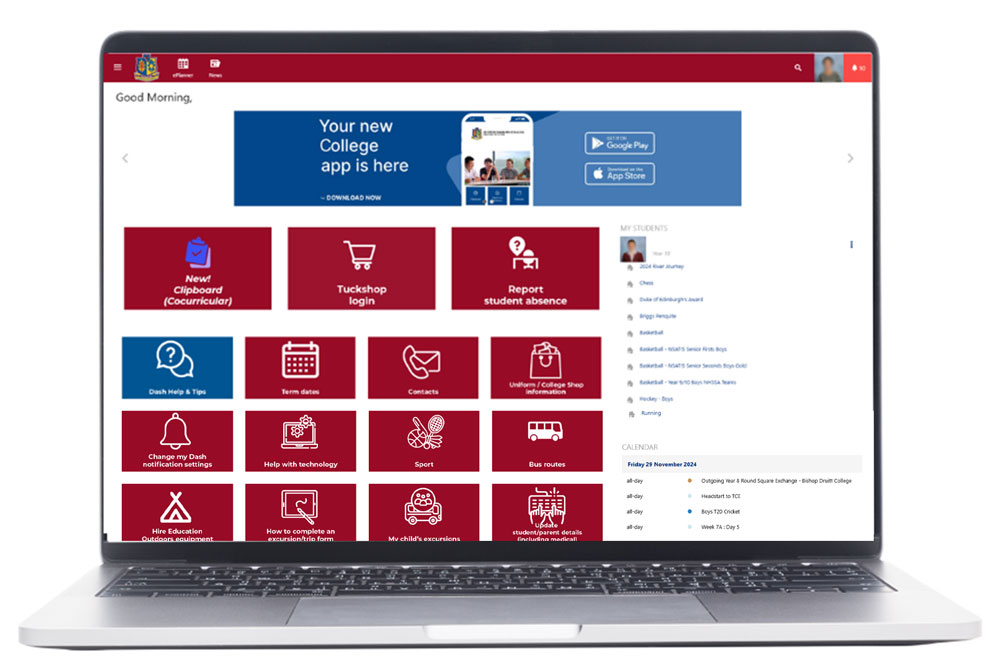
We encourage you to become familiar with The Dash and the College App, designed to help keep you informed about your child’s College life. 

The Dash

  • Easy Access: Centralised access to timetables, due work, results, and much more, all in one place.
  • Stay Updated: Receive a daily email digest summarising the news and updates you need to know, with clickable links for more details.

Logging on to The Dash

How to login: New families – you will receive an activation email with instructions for linking your Microsoft account or how to create an account. Here’s how to get started.

Trouble logging in? Find support here.

The College App

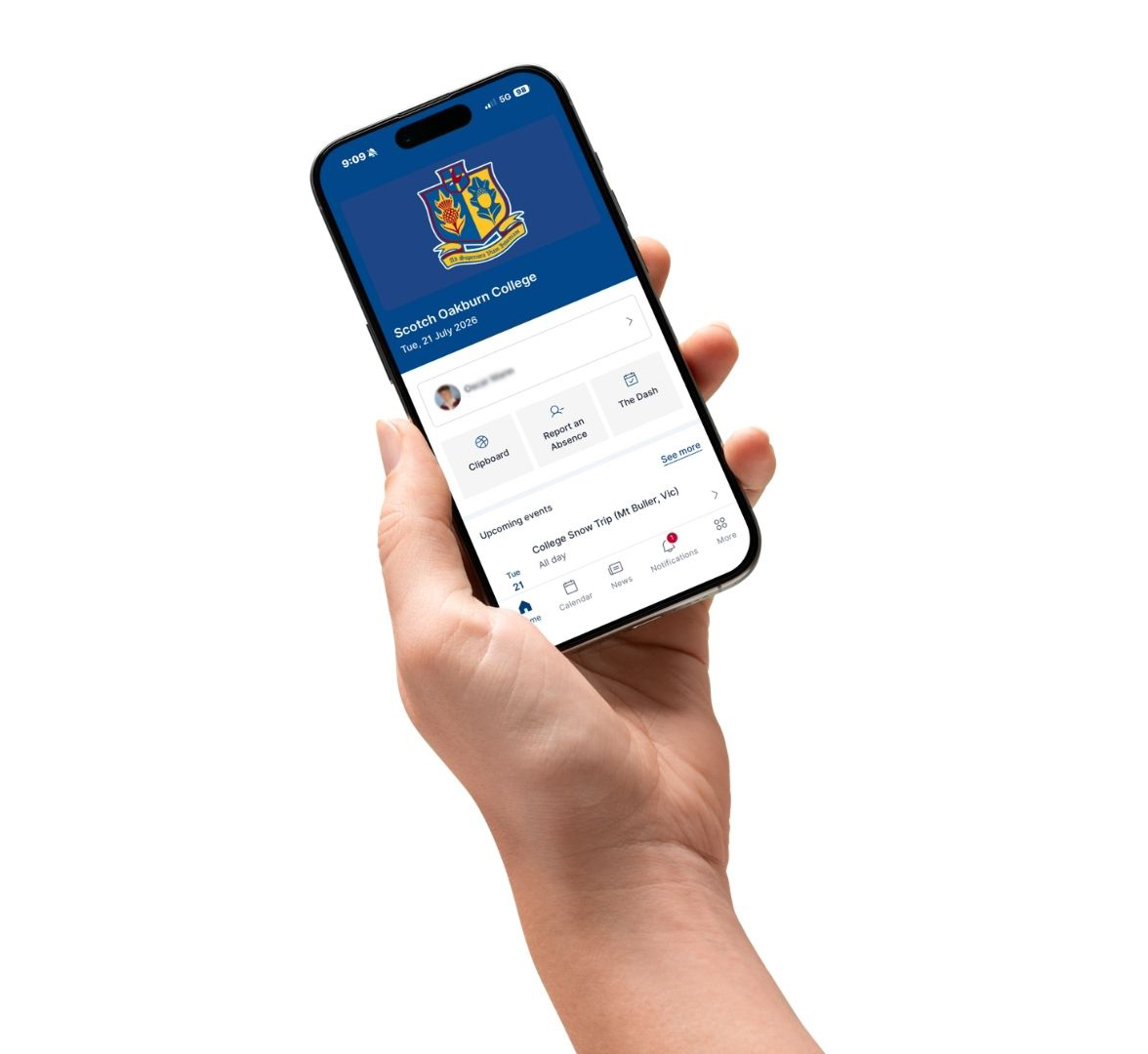
Download the College App for easy access to College information.

Clipboard: Quick access to co-curricular schedules, event locations, and real-time notifications for updates or changes.

Report an absence: See below.

Calendar: View the College Calendar quickly here.

News: Keep up to date on news and updates you should be aware of.

Learning: Check your child’s timetable, due work and results.

Excursions: A link to complete permission forms.

The Dash: A quick link to the full browser version of The Dash is also available.

Contacts: Find out how to contact the College.

Make a Payment: A quick gateway to paying your account.

Make sure you enable push notifications when you download the App so you can be notified in real time of important information.

Download the App:


REPORT AN ABSENCE USING THE APP!

The quick and easy way for you to report an absence. Using the app, click on ‘Report an Absence’, select your child and enter the reason they will not be at school. Our systems will automatically update so your child’s class teacher/s are aware.


Managing bus bookings with RollCall

RollCall is the College’s bus management system, requiring students to use a tap on/tap off card system. Parents and carers manage student bus bookings directly via the RollCall Parent App or Web Portal.

Benefits of RollCall

  • Live Bus Map
    Track the College bus in real time when it’s running.

  • Seat Booking
    Reserve your child’s seat on any route.

  • Booking Changes
    View, edit or cancel trips whenever you need.

  • Alerts & Notifications
    Receive updates when your child taps on or off the bus.

Getting Started

All parents/carers with a login to The Dash have access to RollCall. All you need do is download the app or access the web portal and login.
For detailed instructions on how to download the app and/or access the web portal visit the Bus Routes page on The Dash via this link. Here you will also find links to short video tutorials.

Important Reminders

  • Your child must carry a valid bus pass / student ID card to travel.

  • Both a booking and the card are required to board.

  • Fares apply for every booking, even if the student doesn’t travel.

  • All charges are billed to your College account.

Need Help?

If you have any questions or need assistance, email our Bus Coordinator at buses@soc.tas.edu.au or call (03) 6336 3455.

Download the App:

Keeping your details current

It is essential that we have up-to-date medical and personal information for every student in our care. This information is critical for safety, camps, and excursions.

In 2026, we are introducing electronic parent/carer consents for the administration of paracetamol, antihistamines and anti‑inflammatory medication, meaning there will no longer be extra medication forms to complete.

Please take a moment now to complete your child’s consents for the administration of paracetamol, antihistamines and anti‑inflammatory medication. You can do this on The Dash using the link on your home page “Update Parent/Student Details“. Select your name/profile and your child’s name/profile to check details and review: contact, emergency and medical details, permissions, and complete the new medication consents (under Medical for each child) via the Edit and Save buttons.

Should you encounter any issues, email your updates to:
Junior School:
juniorschool@soc.tas.edu.au
Middle School:
middleschool@soc.tas.edu.au
Senior School:
seniorschool@soc.tas.edu.au

This information is also used for camps and excursions and as such it is very important that it remains current and accurate for the welfare of your child(ren). 

College Policies

Make sure you’re familiar with our College policies.

Both our Student Code of Conduct and Parent Code of Conduct policies set the standard for behaviour for our students, as well as our staff and community.

Mobile Phone Policy: Please ensure you and your child/ren are famiiar with the new Mobile Phone and Wearable Policy before the start of Term.

View our College Polcies here

If there is an urgent need to communicate with your child(ren), this is done by contacting the appropriate College Reception and the message will be passed on.

Student Behaviour Support Framework

We believe in fostering a safe, respectful, and supportive environment where all students can thrive. Our Student Behaviour Support Framework is designed to guide students in making positive choices, while addressing challenges through a clear, consistent, and restorative approach. By focusing on relationships, accountability, and tailored support, we aim to nurture growth, learning, and wellbeing for every child.

View the Student Behaviour Support Framework here.

COLLEGE TUCKSHOPS

Our tuckshops operate on a cashless system. Families are encouraged to order in advance through My School Connect, which also allows you to top up balances linked to Student ID cards (Penquite Campus) for over counter purchases. Please note that payment over the counter using mobile phone payment options is not available.

Login to My School Connect to pre-order or view the updated Dash pages when students return on the following links for more tuckshop information.

Elphin Tuckshop

Penquite Tuckshop

ASCA - Better Buying Power For Schools

Your My School Connect account allows you to purchase uniform items online and order lunches for your child/ren, ready to be collected.

Activating your My School Connect Account

Transferring your account to another family member

Forgotten your password?

Welcome to Campus

Find out where students need to be on the first day and other important information from your Head of School.

Welcome to the Junior School

Peter Williams, Head of Elphin Campus, welcomes our community to campus for 2026.

Pick up and Drop Off

Find out where and what time

Connecting Home and School

Find out who to contact

Welcome to the Middle School

Kiran Oates Pryor, Head of Penquite Campus – Middle, welcomes our community to campus for 2026.

Arriving on the first day of Term

Find out where to go and what time

Connecting Home and School

Find out who to contact

Welcome to the Senior School

Sarah Lillywhite, Head of Penquite Campus – Senior, welcomes families to the start of  2026.

Arriving on the first day of Term

Find out where to go and what time

Connecting Home and School

Find out who to contact

Welcome to the Boarding House

Head of Boarding, Lionel Randall, welcomes our boarding community to 2026.

Arriving and settling in

Find out when you are able to arrive

Connecting Home and Boarding

Find out who to contact

Important Dates to start the year

BEFORE TERM BEGINS

Check The Dash Calendar for all events.  Download the College App to have the calendar close at hand.

View 2026 Term Dates here

  • Tuesday 27 Janaury is a Professional Learning Day for staff.
    Our College receptions will be closed  on this day to ensure all staff are able to participate in important sessions.  We thank you for your understanding.

  • The College Shop will be open from 2:00 pm to 5:00 pm on Tuesday 27 January and from 9:00 am to 5:00 pm on Wednesday 28, Thursday 29 and Friday 30 January  should you need last minute purchases.

  • Our Boarding House welcomes new boarders from 2:00 pm and returning boarders from 4:00 pm on Sunday 1 February. 

Checklist

THE FIRST FEW WEEKS OF TERM

Checklist

  • Upcoming events: Are there any upcoming events you need to be aware of?
    There is a lot happening to start the year – these are just the first few weeks of Term.  Check The Dash Calendar for all events.

  • Penquite Coffee
    Monday 2 February from 8:00am
    We invite you to join us for a coffee catchup in the Middle School Plaza.

  • New Family Gathering
    Monday 2 February from 5:00 pm
    All families new to the College are invited to join us from 5:00 pm to 7:00 pm at our New Family Gathering

  • Honours Assembly
    Tuesday 3 February 9:00 am
    HPEC@Penquite

  • Year 9 Information Evening
    Wednesday 4 February 6:30 pm

  • Year 10 Information Evening
    Wednesday 4 February 7:45 pm

  • Year 6 Information Evening including Educations Outdoors presentation
    Thursday 5 February 6:00 pm

  • Year 7 Information Evening including Educations Outdoors presentation
    Thursday 5 February 7:00 pm

  • Year 6 Coastal Explorers Education Outdoors program
    Monday 9 February – Wednesday 11 February

  • Year 3 – 5 House Swimming Trials
    Monday 9 February

  • Elphin Parent Information Session (Prep – Year 5)
    Tuesday 10 February
    Session 1 5:00 pm, Session 2 6:00 pm

  • Scotch Oakburn College Community Golf Day
    Friday 13 February (Sold Out)

  • Penquite House Community Event
    Monday 16 February 4:00 pm to 7:00 pm

  • Penquite House Athletics Carnival
    Thursday 19 February
    Northern Athletics Centre, St Leonards

  • Year 7 Valley Life Education Outdoors program
    Monday 23 February to Friday 27  February

2026 Public Holidays

Monday 26 January: Australia Day
Monday 9 March: Eight Hours Day
Monday 27 April (during Term 1 break): ANZAC Day
Monday 8 June: King’s Birthday
Monday 2 November: Recreation Day